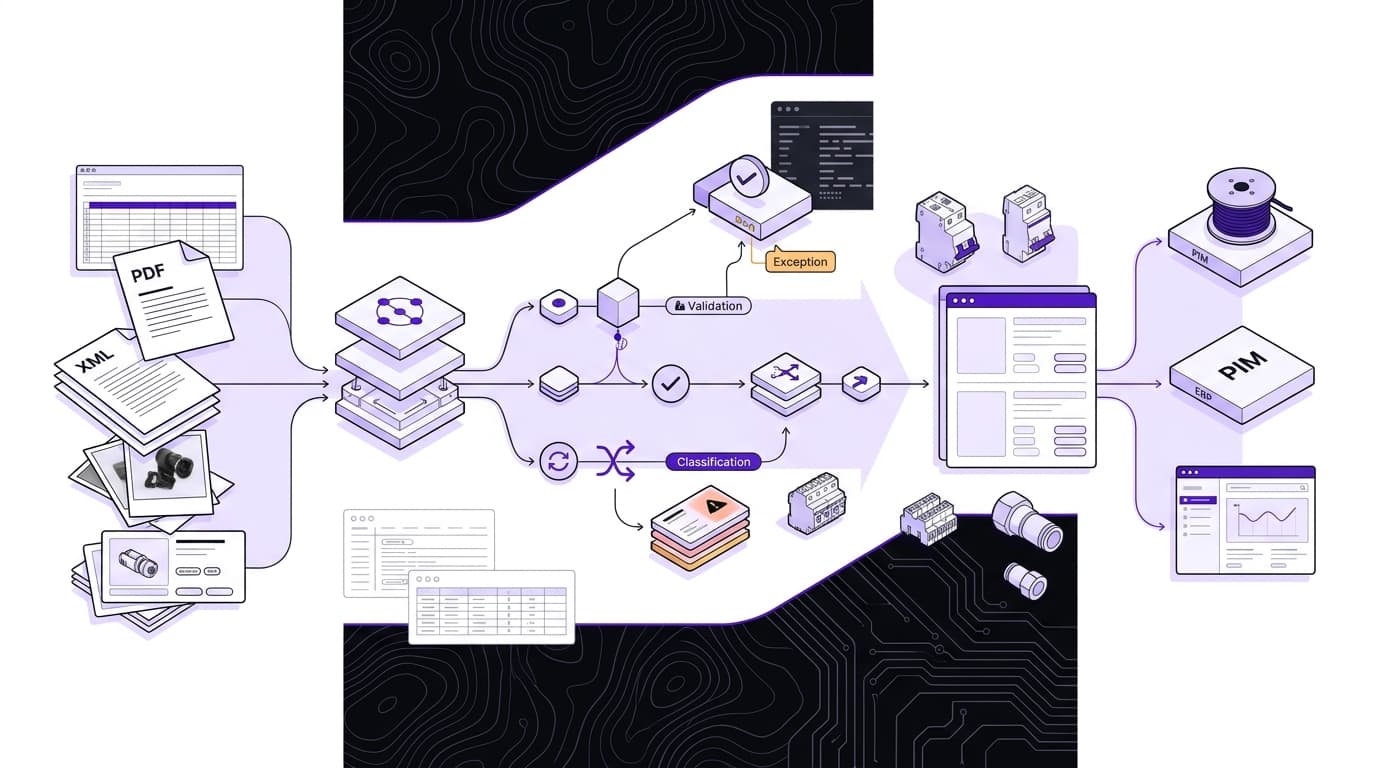
Import supplier data without retyping: any format in, your import file out
Importing supplier data is often a manual bottleneck: manufacturers deliver product information in different formats, structures and languages. The FacetFlux supplier portal reverses that process. It accepts the files your suppliers already have, maps the content to your target schema, normalizes values and outputs your own import file.
When every range arrives in a different shape
Purchasing has agreed on a new range. Now the items need to go into the shop or the ERP. The supplier sends an Excel file with commercial master data, a PDF with technical specifications and a separate folder of product images. Sometimes a BMEcat file comes on top.
BMEcat is an XML-based exchange format with sections such as HEADER, T_NEW_CATALOG, PRODUCT, PRODUCT_FEATURES and MIME_INFO, as this overview of the standard shows. Typical content includes SKUs, descriptions, prices, currencies, images, data sheets, classifications, packaging units, dimensions and weights. The format does not define how features or units in the PRODUCT_FEATURES block must be named. So even a formally correct file can contain different names, units or structures. You can check a supplier BMEcat against the specification with the free BMEcat validator.
For the catalog team, this is where the real work starts: compare content, map columns, unify units, chase missing values and copy data into the import structure. For a cable, cross-section, length, rated voltage and sheath material may be spread across different files. For a circuit breaker, the number of poles and the tripping curve may sit in the PDF, while price and packaging unit come from the Excel sheet. The mapping must not only work technically; it must also keep the right SKU across all sources.
Then there are variants and media. A supplier can name product images by SKU, by model family or with free file names. Without a fixed mapping rule, images easily end up on the wrong item. Decimal separators, units and spellings need checking too: 1.5 mm², 1.5 mm2 and 1,5 qmm can mean the same value but are not equally usable for an import.
Standardized formats reduce technical mess, but they don't automatically resolve differences in terminology and data quality. So the first useful step is an inventory. Which sources exist, which field leads, which data is mandatory, and which values may only be taken from the original?
Why rigid supplier templates often fall short
Many distributors try to solve the problem with their own Excel templates or forms. The manufacturer is supposed to copy the data into exactly that structure. In practice, that is extra work for suppliers. They export what their own system provides, not necessarily the format of every single customer.
A template can make mandatory fields visible. But it says little about whether a supplier has the information at all, or how it should be read. A "material" field can expect stainless steel, a material number or a marketing name. "Dimensions" can mean one string or separate fields for length, width and height. Without follow-up questions, a filled-in template can be formally complete and still inconsistent in content.
The more practical approach reverses the process: suppliers send the data they have. The catalog team defines its own target schema once, for example from a valid sample import file. Incoming content is then mapped onto that structure. For every target field, define which source it may come from, which unit it expects and what happens when sources conflict.
That also lowers the barrier for suppliers. A manufacturer does not have to maintain a new template for every customer; they provide their existing exports, data sheets and media. For the catalog team, the work shifts from retyping to rules and exceptions: units are defined once, and unclear or missing values are asked for specifically.
Depending on the target system, the output can be an Excel, CSV or BMEcat file. Inch values can become millimeters, and "24VDC" a consistently formatted "24 V DC". Product attributes go into the fields your shop, ERP or PIM expects. Translations can be part of the same process, as long as the source data carries enough information; see product data translation. Before rollout, test the mapping with real files from several suppliers, because the same template often hides different edge cases in practice.
What the processing can do, and what it can't
Such a system can structure, format, map and in some cases enrich data. It can map a "Voltage" column, a PDF feature "rated voltage" and the value "24VDC" to the target field "rated voltage", provided the mapping is clear. It can unify spellings, link media by SKU and bring values into the form your target import expects.
It must not invent missing facts, though. If weight, a required certificate or a GTIN is missing, the record is marked incomplete. The open points then go back to the supplier as a concrete checklist. A good output file therefore contains not only filled fields but also traceable notes on which data was taken over, normalized or not found.
Conflicting sources call for restraint too. If the Excel file states a different length than the PDF, the processing must not silently pick one value. The record goes onto a review list instead. The same applies to terms that look similar but mean different things in different product classes. Automatic mapping is most reliable where source field, target attribute, unit and value list are clearly defined.
Formal errors can also be caught before import. The GTIN batch validator checks a whole list of GTINs and EANs for valid check digits, and the BMEcat validator checks the file structure. Neither replaces a subject-matter review of the product data, but both stop obvious structure or identifier errors from surfacing only in the target system. Business sign-off stays a separate step.
For catalog teams in technical wholesale
This approach is mainly for catalog and product data teams at distributors and technical wholesalers. Ranges with cables, circuit breakers, terminals, fasteners and hydraulic and pneumatic components are especially demanding. Transferring description text is not enough here. Technical features must land in the right class, unit and value list.
For a cable, number of cores, cross-section, outer diameter, rated voltage and sheath material can decide the selection. For a pneumatic component, connection type, operating pressure and temperature range belong together. If a value goes into the wrong attribute or comes out with the wrong unit, the record still imports, but it produces useless filters or wrong product recommendations. So always check the mapping against concrete sample items from each product group.
ETIM provides class names, feature names and value lists in several languages; eCl@ss also offers multilingual structures for class names, features and value lists. ETIM works with flat product classes and defined technical selection features, while eCl@ss uses a hierarchy of segment, main group, group and subgroup or class. Keep these differences in mind when you map into shop or ERP fields. You can find the matching ETIM class with the ETIM class lookup.
The standards make mapping easier, but they don't take the review off the catalog team's hands. A wrongly mapped thread, a mixed-up voltage or a wrong unit can lead to a wrong selection. Check rules per product group help: mandatory features, allowed units, expected value ranges and dependencies between attributes. A catalog team can, for example, check that an item with a certain connection type also carries the matching connection size.
Product data errors should surface before import, not after the item goes live in the shop. How deep the check goes depends on the range, the target system and the sales channel. The data completeness check shows how complete a supplier file is, column by column.
Translations with controlled terminology
Multilingual catalogs need more than translated titles and descriptions. Filter values and technical features must be handled consistently too. SKUs, GTINs, dimensions, units, norm designations such as EN ISO 20345, protection ratings such as IP65, material codes and CE marks stay the same in every product record and are not translated.
A glossary and skip rules take care of this. FacetFlux builds the glossary automatically from your catalog: recurring attribute values get one fixed translation per target language, and your team reviews the list. Skip rules keep SKUs, brands, units and norm designations untouched. So the same value does not appear under different terms in the catalog, and no seemingly separate filter values appear. For variant ranges, it can also make sense to maintain description text at model level and inherit it to the SKUs. There is more on this in the product data translation guide.
Consistent terminology is not automatically the best solution in every context, though. Translation-quality research points out that identical translations can suppress valid variants and that a term can be consistently wrong in the wrong context. Standardize technical filter values globally; for descriptive or context-dependent text, check whether the same source value really needs the same target translation.
Your PIM stays as it is
The main advantage of this upstream workflow is that your existing PIM, online shop and ERP do not need to be replaced. FacetFlux works as a translation and formatting step in front of your existing systems. You define the target schema from your requirements, and supplier data is prepared in that schema.
The portal is not a leading product data source and not a replacement for your PIM. It delivers an import file in the format your target system expects, such as Excel, CSV or BMEcat. Existing integrations keep working as long as the target format and the required field structures stay the same.
The supplier portal flow in five steps:
- You invite a supplier.
- The supplier uploads what they have: Excel, PDF or XML, in any language.
- FacetFlux maps the content to your template and normalizes units, spellings and technical values, with translations where you need them.
- Missing or conflicting points go back to the supplier as a checklist.
- You download your import file and review the exceptions.
The supplier portal is live. Start with one supplier's files and check the import file before you invite more suppliers. What your suppliers see is on the for suppliers page.
When data quality is right, the catalog team spends less time copying and reformatting. The review stays, but it focuses on mapping, completeness and exceptions.
Sign up free and get trial credits
Sources
- Jenseits von BMEcat: Deep Dive in eCl@ss & ETIM für dein PIM
- ETIM BMEcat – Standardisiertes Austauschformat für elektronische Produktkataloge
- Produktdaten übersetzen: Warum das kein Textprojekt ist, sondern ein Datenprojekt
- E-Commerce-Übersetzung 2026: Was tatsächlich funktioniert
- Produktkataloge übersetzen: vom PIM-Export in jeden Markt
- Translation Memory: bis 70 % sparen | Übersetzungsagentur tolingo
- Übersetzungen für E-Commerce & Handel | Fachübersetzungen für den E-Commerce